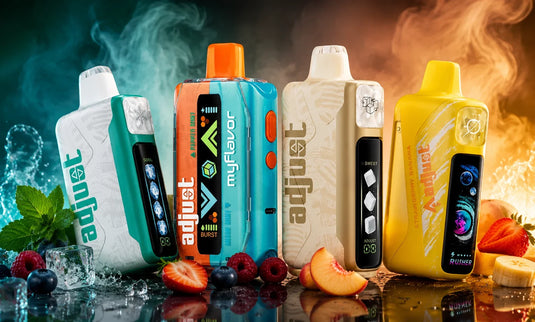
If you are wondering why your Adjust Vape is not working, you are not alone. It is one of the most common questions from Adjust Vape users, and the good news is that most issues take less than 60 seconds to fix without any tools. This guide covers every 40K model: MyCool, MyRusher, MySour, MyFlavor, and MySweet. Match your symptom to the table below and jump straight to your fix.


Table of contents
Quick Symptom Diagnostic Table
Find your symptoms below. The last column shows how long the fix typically takes, so you can decide quickly.
Symptom |
Likely Cause |
Fix Section |
Est. Fix Time |
No vapor, no lights, no screen |
Dead battery |
Fix #3 — Not Charging |
60-90 min charge |
Blinking but no vapor |
Low battery or puff cutoff |
Fix #2 — Blinking |
Under 1 min |
No vapor at all on the new device |
Silicone plug still in place |
Fix #1 — Not Hitting |
10 seconds |
Burnt or cardboard taste |
Dry coil or high power mode |
Fix #4 — Burnt Taste |
Under 1 min |
The screen is blank |
Dead battery or firmware freeze |
Fix #5 — Screen Issue |
15 min charge |
Tight draw or no airflow |
Blocked airflow slot |
Fix #6 — Airflow |
30 seconds |
Gurgling or liquid in the mouth |
Condensation buildup |
Fix #7 — Leaking |
Under 1 min |
The device fires without drawing |
Short circuit or sensor fault |
Fix #8 — Auto-Firing |
Stop use now |
Fix #1 — Adjust Vape Not Hitting (No Vapor at All)
Before anything else, run through this checklist. Most new-device complaints trace back to Step 1.
Remove the silicone plugs. Every Adjust device ships with protective plugs in the mouthpiece and the airflow slot. Pull both off before your first use. This one step resolves roughly 40% of 'dead on arrival' reports.
Look at your grip. Depending on the model, the airflow slot can be found on the bottom or side of the device. If your palm covers it, air can't get in, and the draw sensor won't work. Move your fingers and try again.
Gently tap the device against your palm. Air bubbles can get trapped near the wick inside the tank. A few light taps let the liquid flow back to the coil.
Draw slowly. A hard, quick pull makes too much vacuum and can lock the pressure sensor. Try a steady 2 to 3 second draw instead.
Look at the smart display to see how much e-liquid is left. If it reads near zero, the tank is empty.
Quick Note: If you just bought the device and nothing responds at all, no lights and no screen, go directly to Fix #3. The battery might have run out of power while it was being shipped. |
Fix #2 — Adjust Vape Blinking but No Vapor
The blink pattern on your Adjust Vape is a built-in diagnostic signal. Each pattern points to a specific cause.
Blink Pattern |
What It Means |
What To Do |
3 rapid red blinks |
Battery below 10% |
Plug in via USB-C immediately |
Steady blinking during a draw |
10-second puff cutoff triggered |
Release, wait 5 seconds, draw again |
Alternating red and amber blinks |
Overheating protection activated |
Set the device down for 2 full minutes |
Rapid blinking after a full charge |
Possible hardware fault |
Contact Adjust Vape support |
Screen shows E: 0% |
E-liquid fully depleted |
Time to replace the device |
If blinking continues after a full charge, reach out to Adjust Vape customer support with your order number.
Fix #3 — Adjust Vape Not Charging
Plug it in and nothing happens? Work through the steps below before assuming the device is defective.
Swap the cable. Cheap USB-C cables fail often. Try a cable you know works for phone charging.
Use the right adapter. Use a standard 5V / 1A wall adapter. The charging circuit of the device may become confused by fast chargers operating at 9V or more. A basic wall brick or laptop USB port works best.
Clean the USB-C port. Pocket lint is a common problem. Use a dry toothpick or a puff of compressed air to clear the port. Never use anything metal.
Give it 15 minutes. A fully depleted battery sometimes needs a slow trickle charge before the screen lights up. Plug it in and wait before drawing any conclusions.
Model |
Battery |
Full Charge Time |
Charging Port |
850 mAh |
60-75 min |
USB-C |
|
1,000 mAh |
75-90 min |
USB-C |
|
850 mAh |
60-75 min |
USB-C |
|
850 mAh |
60-75 min |
USB-C |
|
850 mAh |
60-75 min |
USB-C |
Battery Safety: Always charge on a hard, flat surface. Never charge on a bed or couch. The U.S. Consumer Product Safety Commission (CPSC) recommends keeping lithium-ion devices away from flammable materials while charging. |
Fix #4 — Burnt Taste or Weak Flavor
A burnt taste almost always means the wick is dry and not getting enough liquid. Here is how to fix it.
Lower the power setting. Liquid is burned by high power more quickly than the wick can re-saturate. On the MyRusher, switch from Rush Mode to Normal. On the MyCool, MySour, and MySweet, drop from Level 4 to Level 2.
Let the device rest between draws. After every 3 to 4 puffs, wait 15 to 30 seconds. The wick needs that time to absorb more liquid.
Watch the e-liquid percentage. When the tank drops below 20%, the coil is partially exposed, and burnt flavor becomes more likely. If the screen is showing a low number, you are nearing the end of the device.
Warm the device up in cold weather. Cold temperatures thicken e-liquid and slow absorption. Hold the device in your hand for 2 to 3 minutes before drawing if it has been stored somewhere cold.
MyCool Tip: Running Level 4 coolness on high power at the same time is the fastest way to produce a dry hit. For everyday use, Level 2 coolness on medium power delivers consistent flavor with far less coil wear. |
Fix #5 — Adjust Vape Screen Not Turning On
Every Adjust Vape has a smart display that shows battery percentage, e-liquid level, and the current mode. Here is what to do when it goes dark.
Charge the device first. A dead battery means a dead screen. Plug in via USB-C and wait at least 15 minutes. Some deeply drained batteries show no indicator for the first 5 to 10 minutes of charging.
Try restarting with force. Hold down the power or mode button for ten complete seconds. The firmware chip on draw-activated models without a button can be reset by plugging in the charger.
Look for physical damage. Cracks, water spots, or distorted pixels indicate screen damage. The device may still produce vapor even with a broken display. Contact Adjust Vape support if you purchased directly from the store.
Understanding what each display element means:
Display Element |
What It Shows |
When to Act |
BAT % |
Remaining battery level |
Charge when it hits 15-20% |
LVL % |
Remaining e-liquid level |
Flavor degrades below 20% |
Mode icon |
Current power or coolness level |
Adjust based on use case |
Charging icon |
Active charge in progress |
Steady = charging normally |
Fix #6 — Airflow Blocked or Draw Feels Too Tight
Find the airflow slot: Depending on the model, it is either on the side or at the bottom of the device. Verify that nothing is covering it, such as a case, a sticker, or your palm.
Clean it out: Use a dry cotton swab or toothpick to remove lint or dust from the slot. Pocket carry builds up debris quickly.
Adjust the airflow ring if your model has one: Turn it counter-clockwise for a looser, more open draw.
MyCool Note: Running Level 4 coolness creates denser vapor that naturally feels tighter on the inhale. Before assuming the airflow slot is blocked, try dropping to Level 2 coolness. If the draw loosens up, the coolness setting was the cause, not a clog. |
Fix #7 — Adjust Vape Leaking or Gurgling
Gurgling is almost always caused by condensation in the airway rather than a malfunction. Here's how to distinguish between the two and how to resolve each situation.
|
CONDENSATION (Normal) Gurgling sound when drawing A small amount of moisture on the mouthpiece No visible liquid outside the device Fix: Hold upright. Take 3 to 4 short, light puffs. Wipe the mouthpiece dry. |
SEAL FAILURE (Replace Device) Visible liquid pooling outside the device body Liquid entering your mouth while drawing Unusual smell from the base Fix: Stop using it immediately. Contact Adjust Vape support for a replacement. |
Store your device upright at room temperature. Leaving it on its side or in a hot car above 95 degrees F causes liquid expansion and increases pressure on the seals.
All Adjust Vapes are sealed, closed pod systems. Never try to open, refill, or modify the device. Doing so will void the device. |
Fix #8 — Adjust Vape Auto-Firing
|
⚠️ STOP USE IMMEDIATELY if your device is producing vapor or heat without you drawing. This is not a fixable issue. 1. Disconnect the device from any charger right away. 2. Place it on a non-flammable surface, away from your body. 3. Do not attempt to troubleshoot or disassemble it. 4. Contact Adjust Vape support with your order number. 5. Dispose of the device at a certified e-waste collection point. The EPA provides guidance on proper lithium-ion battery disposal at epa.gov. |
Model-Specific Troubleshooting at a Glance
Model |
Unique Feature |
Most Common Issue |
Quick Fix |
MyCool 40K |
4-level coolness |
Max coolness drains battery 30% faster |
Use Level 2 daily; save Level 4 for short sessions |
MyRusher 40K |
Rush Mode (dual coil) |
Rush Mode increases coil wear rate |
Switch to Normal Mode when the battery drops below 30% |
MySour 40K |
4-level sourness |
High sourness feels harsh at low e-liquid levels |
Lower the sourness level when the tank is below 30% |
MyFlavor 40K |
Dual-flavor system |
One flavor chamber empties faster than the other |
Switch to single-flavor mode to use the remaining liquid |
MySweet 40K |
4-level sweetness |
High sweetness builds up residue on the coil |
Alternate between Level 2 and Level 4 for daily use |
Is Your Adjust Vape Authentic? Check Before You Troubleshoot
A counterfeit device will not perform like the real thing. If a brand-new device does not respond to any of the fixes above, verify its authenticity first.
Check |
Authentic Adjust Vape |
Likely Counterfeit |
QR Code |
Scratch-off panel on box; scan confirms authenticity page |
No QR code, or QR links to an unrelated site |
Smart Display |
Crisp screen showing battery %, e-liquid %, and mode |
Blurry screen, missing info, or no screen at all |
Packaging |
Clean printing, correct brand colors, sealed shrink wrap |
Typos, wrong colors, or loose packaging |
Adjustment Controls |
Buttons click firmly, and mode changes appear on the screen |
Mushy buttons or no on-screen feedback |
Purchase Source |
Purchased from adjust-vape.com or an authorized U.S. retailer |
Random marketplace, no verifiable return policy |
Purchase directly from adjust-vape.com to guarantee warranty coverage and device authenticity.
Pro Tips to Keep Your Adjust Vape Running at Full Performance
Store upright at room temperature (60 to 80 degrees F). Vertical storage prevents liquid from pooling in the airway.
Avoid chain vaping. Allow 10 to 15 seconds between draws. This lets the wick re-saturate and prevents dry hits.
Charge before 15%. Deep-discharging lithium batteries degrades capacity over time. Plug in when the screen hits 15 to 20%.
Clean the USB-C port weekly. A quick pass with a dry toothpick keeps the charging connection reliable.
Use mid-range settings for everyday vaping. Level 2 on coolness, sourness, or sweetness paired with medium power is the best combination for consistent performance and longer coil life. Reserve Level 4 and Rush Mode for shorter sessions.
Keep the device out of your back pocket. Sitting on it can bend internal connections. Use a front pocket or a bag.
Most Adjust Vape issues come down to one of eight causes: a missing silicone plug, a blink code the device is trying to signal, a charging issue, a dry coil, a blank screen, a blocked airflow slot, condensation buildup, or auto-firing. Run through the fix that matches your symptom, and most problems resolve in under a minute.
At Adjustvapedisposable.com, we make it simple for you to explore and discover new flavors by model. With an intuitive interface, enhancing your vaping game has never been easier. Start exploring now and take your experience to the next level!
Frequently Asked Questions
Why is my Adjust Vape blinking red?
Three rapid red blinks mean the battery is below 10%. For a complete charge, insert a USB-C cable and give it 60 to 90 minutes. After a full charge, the battery might be faulty if the red blinking persists. For help, get in touch with Adjust Vape support.
How long does an Adjust Vape take to fully charge?
The MyCool, MySour, MyFlavor, and MySweet models each carry an 850 mAh battery and charge in 60 to 75 minutes. The MyRusher carries a 1,000 mAh battery and takes 75 to 90 minutes. Use a standard 5V / 1A adapter for best results.
Why does my Adjust Vape taste burnt on the very first puff?
The coil may have dried out a little bit if the device was stored in a warm warehouse while it was being shipped. Take 3 to 4 short, gentle draws without fully inhaling to pull liquid back into the coil. If the burnt taste continues after 10 puffs, the unit may be defective. Request a replacement from Adjust Vape support.
How long does an unopened Adjust Vape last in storage?
A sealed, unopened Adjust Vape retains its e-liquid quality for 12 to 18 months when stored upright in a cool, dark location below 75°F (24°C). Keep devices in their original packaging and away from direct sunlight to preserve both flavor and battery integrity.
My screen shows 0% battery after I just charged it. What is wrong?
Try a different USB-C cable first. A faulty cable can appear to charge without actually delivering power. If the problem keeps happening with a cable that you know works with a 5V / 1A adapter, the battery inside may be broken. This is covered under warranty for devices purchased directly from adjust-vape.com.
Can I refill my Adjust Vape when the e-liquid runs out?
No. All Adjust Vapes have closed pods and sealed tanks that hold 20 mL of liquid. They are not meant to be opened or refilled. Attempting to do so will void the device and can cause leaks. When the e-liquid is depleted, it is time for a new device.
Why is my Adjust Vape not working after I charged it?
If the device still does not respond after a full charge, work through Fix #1 first to rule out a blocked silicone plug or covered airflow slot. The gadget might be faulty or fake if none of the standard tests fix the problem. Use the QR code on the packaging to confirm authenticity, and if the problem continues, get in touch with support.
What does the number on my Adjust Vape screen mean?
The display shows three pieces of information: battery percentage (BAT), e-liquid level (LVL), and the current mode setting. For example, BAT 78% means the battery has 78% charge remaining. LVL 2 on a MyCool means the coolness is set to the second of four available levels.
Can cold weather cause my Adjust Vape to stop working?
Yes. Cold temperatures thicken e-liquid and slow down wick absorption. If your device was stored in a cold car or outdoor environment, hold it in your hand for 2 to 3 minutes to warm it up before using it. The device itself is not damaged; the liquid just needs to return to a normal operating temperature.
How can I tell if my Adjust Vape is a fraud?
Use the camera on your phone to scan the QR code on the package. Authentic devices direct you to a verified Adjust Vape page. Also, check that the display is crisp, the adjustment buttons click firmly with on-screen feedback, and the packaging has clean printing with no typos. When in doubt, purchase only from adjustvapedisposable.com or an authorized U.S. retailer.
Do you have more questions about Adjust Vape? Please reach out to our support team at support@adjustvapedisposable.com or call 1(678)749-3660. We’re here to guide you! Visit our blog for more vaping tips and insights.