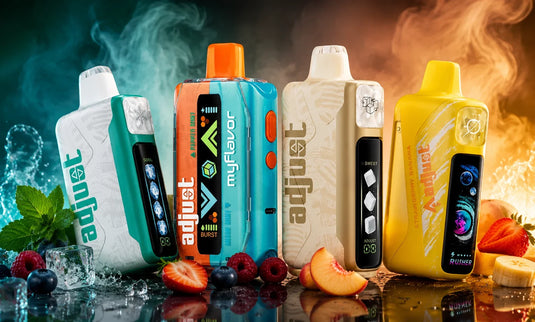
If you've just picked up your Adjust Vape device and are wondering how to use it, you're in the right place. In this guide, we'll walk you through everything you need to know about how to use Adjust Vape, from turning it on to adjusting the flavors and cooling settings, all the way to recharging and powering off. Whether you're new to vaping or just new to the Adjust Vape, we've got you covered with simple steps to get the most out of your device.
Let's make sure your vaping experience is smooth and enjoyable!
1. Unbox and Inspect Your Adjust Vape
The first step to enjoying your Adjust Vape is getting it out of the box and ensuring everything is in place. Your device should be pre-filled, pre-charged, and ready to go. Before you start, give it a quick visual check to confirm there's no damage from shipping and that everything looks good.
- Tip: If you've purchased a disposable model, you're all set! Ensure your device has enough charge before starting if it's a rechargeable model.
2. Power On Your Adjust Vape
Getting your Adjust Vape started is easy. Simply press the power button five times quickly to turn it on. This will turn the device on, and you'll see the LED screen light up, displaying your current settings and battery level.
- Tip: If your device doesn't have a power button and is auto-activated, simply inhale from the mouthpiece to activate it.
3. Adjust Power Mode (For Maximum Control)
Once your Adjust Vape is on, you can take full control of your vaping experience. Depending on the model, you might have multiple power levels to choose from. The Adjust Vape devices come with the option to toggle between power modes like:
- Turbo I: Offers up to 40,000 puffs for a lighter, more mellow experience.
- Turbo II: Up to 30,000 puffs, providing a balanced hit.
- Turbo III: A more intense mode that delivers a punchy hit and up to 20,000 puffs.
The higher the power level, the more intense the flavor and vapor production, but keep in mind that higher settings can reduce the puff count.
4. Customize Your Flavor Experience
Adjust Vapes also allows you to personalize your flavor profile. If you've picked up a MyFlavor series device, you can adjust the flavor intensity with the push of a button. Here's how it works:
- Press the top button to toggle between six flavor levels.
- The number of flavor cubes displayed on the screen will indicate the intensity, so feel free to dial up or down based on how strong you want your vape session to be!
Whether you like a light touch of flavor or a full-on explosion, Adjust Vapes has you covered.
5. Adjust Cooling for Extra Refreshment (For MyCool Series)
For those hot summer days, or just when you want that extra refreshing hit, you can adjust the cooling effect on your Adjust Mycool device. Simply press the button to toggle between five cooling levels.
- The more ice cubes you see on your screen, the stronger the menthol effect will be! Perfect for those who enjoy that frosty sensation with every puff.
6. Control Sweetness (For MySweet Series)
Are you a fan of sweeter vapes? The Adjust Vape line includes the Adjust Mysweet devices where you can change the level of sweetness. Just press the top button to adjust the sweetness level to your preference.
- The display will show sugar cubes, so you can easily dial in how sweet you'd like your vape to be.
7. How to Recharge Your Adjust Vape
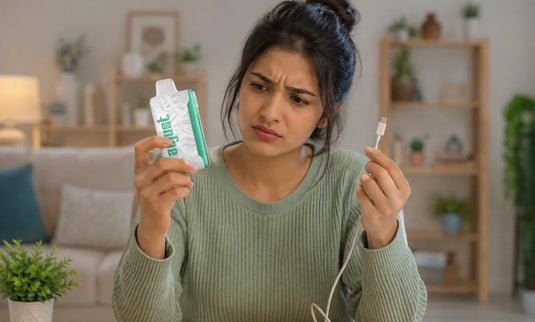
When your battery is running low, just plug your device into a power source using the included Type-C cable. The charging process is fast and efficient, so you'll be ready to continue your vape session in no time.
- Tip: For rechargeable models, make sure the battery is fully charged before your first use. The device's LED screen will show the charging status.
8. Power Off Your Adjust Vape
To conserve battery when you're finished vaping, turn off your device by pressing the power button five times quickly, just like you did to power it on.
This ensures the device is safely powered off and avoids any accidental activation.
Conclusion
Now that you know how to use the Adjust Vape device, you're ready to experience the customization and quality that comes with it. Whether you're adjusting the power, cooling, flavor, or sweetness, Adjust Vapes gives you total control over your vaping experience. So go ahead & get your favorite flavors at adjustvapedisposable.com with us and start experimenting with different settings, and find the perfect balance for your perfect puff.
For more inquiries about the Adjust Vape, feel free to reach out to our support team at support@adjustvapedisposable.com or call 1(678)749-3660. We’re here to assist you! Explore our blog for more vaping tips and insights.